
Systema - System + "ma" (latin for "from") - getting info from system
Systema is a fast, lightweight system information tool written in Odin that provides detailed insights about your system's hardware and software configuration. It displays system information in a clean, colorful format with ASCII art logos.
- Fast & Lightweight: Written in Odin for optimal performance
- Colorful Output: Rich terminal colors with customizable themes
- ASCII Art: System-specific logos and branding
- Comprehensive Info: CPU, memory, storage, kernel, desktop environment
- Customizable: Configurable output and display options
- Odin programming language (latest stable version)
- Linux system
- Nix (optional, for development environments)
# Clone the repository
git clone https://github.com/alvaro17f/systema.git
cd systema

# Build and run
./taskfile build

# Move the generated binary to somewhere in your PATHAdd this in your nixos configuration:
{
  inputs = {
    nixpkgs.url = "github:NixOS/nixpkgs/nixos-unstable";
    systema.url = "github:alvaro17f/systema-odin";
  };

  outputs = { self, nixpkgs, systema, ... }: {
    nixosConfigurations.yourhostname = nixpkgs.lib.nixosSystem {
      modules = [
        {
          environment.systemPackages = [
            systema.packages.${pkgs.system}.default
          ];
        }
      ];
    };
  };
}# Run systema
./taskfile run
# Build optimized release
./taskfile build
# Run with debug info
./taskfile debug
# Run with debug info and address sanitizer
./taskfile debug:sanitize# Run systema directly
systema
# With custom options
systema help
*************************************************************
SYSTEMA - Fetch system information with style
*************************************************************
-d: Disable logo
-l <path>: Set the logo path
-c <color>: Set the logo color by ansi number [default: 36]
-g <gap>: Set the gap between logo and info [default: 3]
-o <offset>: Set the info offset vertically [default: 0]
-h, help: Display this help message
-v, version: Display the current version
In Systema, we use ANSI color codes to add color to the output. Here's a table of common ANSI color codes:
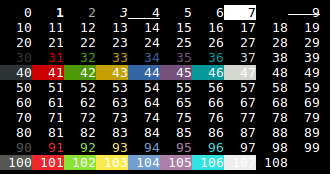
You can change the color of the logo with the -c option in the command line.
systema -c 36 # blue logo
.
├── app/                    # Application initialization
├── assets/                 # ASCII art and assets
├── colors/                 # Color definitions and themes
├── models/                 # Data structures and configuration
├── modules/                # System information modules
│   ├── colors.odin        # Color system utilities
│   ├── cpu.odin           # CPU information and usage
│   ├── desktop.odin       # Desktop environment detection
│   ├── hostname.odin      # Hostname utilities
│   ├── kernel.odin        # Kernel version info
│   ├── memory.odin        # Memory usage statistics
│   ├── shell.odin         # Shell detection
│   ├── storage.odin       # Storage information
│   ├── system.odin        # System information
│   ├── uptime.odin        # System uptime tracking
│   └── username.odin      # User information
├── utils/                  # Utility functions
│   ├── flags.odin         # Command line argument parsing
│   ├── get_logo.odin      # ASCII logo retrieval
│   └── print_info.odin    # Information display utilities
├── vhs/                    # Terminal recordings and demos
├── main.odin              # Main application entry point
├── taskfile              # Build and development scripts
├── flake.nix             # Nix development environment
└── VERSION               # Version tracking
The taskfile script provides convenient development commands:
# Development
./taskfile run          # Run the application
./taskfile debug        # Run with debug symbols
./taskfile debug:sanitize  # Run with address sanitizer

# Building
./taskfile build        # Build optimized release
./taskfile clean        # Clean build artifacts

# Utilities
./taskfile help # Show all available commands# Standard build
./taskfile build
# Manual build with Odin
odin build . -out:systema -o:speed
# Debug build with Odin
odin build . -debug -out:systemaSystema uses a simple configuration system located in models/config.odin. Currently supports:
- Color theme selection
- ASCII art display options
- Information display preferences
- Fork the repository
- Create a feature branch:
git checkout -b feature-name - Make your changes
- Test your changes:
./taskfile run - Commit your changes:
git commit -am 'feat: add something'(conventional commits) - Push to the branch:
git push origin feature-name - Create a Pull Request
This project is licensed under the MIT License - see the LICENSE file for details.
- microfetch - Inspiration for system information display
- odin-color - Color utilities
- vhs - Terminal recordings
- odin - The Odin programming language
Current version: See VERSION file